
What’s the difference?
Techpacker now has two products: Techpack Builder, a desktop app for creating techpacks, and PLMBR, for managing product development, suppliers and samples.
How you start
- AI Tech Packs
- Upload a garment photo or sketch, add your brief and sizes, and generate a draft.
- Techpack Builder
- Bring drawings, tables and notes together on a document page.
- PLMBR
- Create product records and reuse information from your libraries.
What you edit
- AI Tech Packs
- The draft’s drawings, measurements, materials and construction notes.
- Techpack Builder
- Document layouts, sketches, tables and annotations.
- PLMBR
- Shared product details, specifications and revisions. Features depend on the plan.
Where you work
- AI Tech Packs
- In your browser, with an internet connection.
- Techpack Builder
- On Mac or Windows, with local files and offline editing.
- PLMBR
- In a shared product workspace with online team collaboration.
How you share
- AI Tech Packs
- PDF and Excel on Pro; Factory Share for techpacks and collections on Designer.
- Techpack Builder
- Send a PDF or read-only .tpv file. Keep the editable .tp working file.
- PLMBR
- Share PDFs and public links, alongside supplier and product management tools.
Sources: Techpack Builder, Builder exports and versions, PLMBR, PLMBR plan features, and our techpack generation, batch and Factory Share pages.
Making a techpack in AI Tech Packs
Say you’re working on a hoodie and have a photo or sketch to start from. Upload it, add your design notes and choose your sizes. AI Tech Packs generates a draft with drawings, measurements, materials and construction details for you to work on.
- 01 / Start with your designUpload a garment photo or sketch and add your brief and sizes.
- 02 / Make it your ownCheck the draft and fill in the specifications for your garment.
- 03 / Send it to your factorySave the reviewed techpack, then export it or share it with your manufacturer.
You still need to check that draft against the hoodie you want to make. Confirm the fabric, specify the trims and enter the measurements you want the factory to follow. A photo can show the shape of a hood or pocket, but it cannot tell you the exact fabric composition or finished measurements.
Once you’ve reviewed the techpack, you can export it or share it with your manufacturer. For a collection, the Designer plan supports batches of up to 10 styles. You can use shared settings, adjust each style and share the reviewed collection through Factory Share.
Working on the drawings and measurements
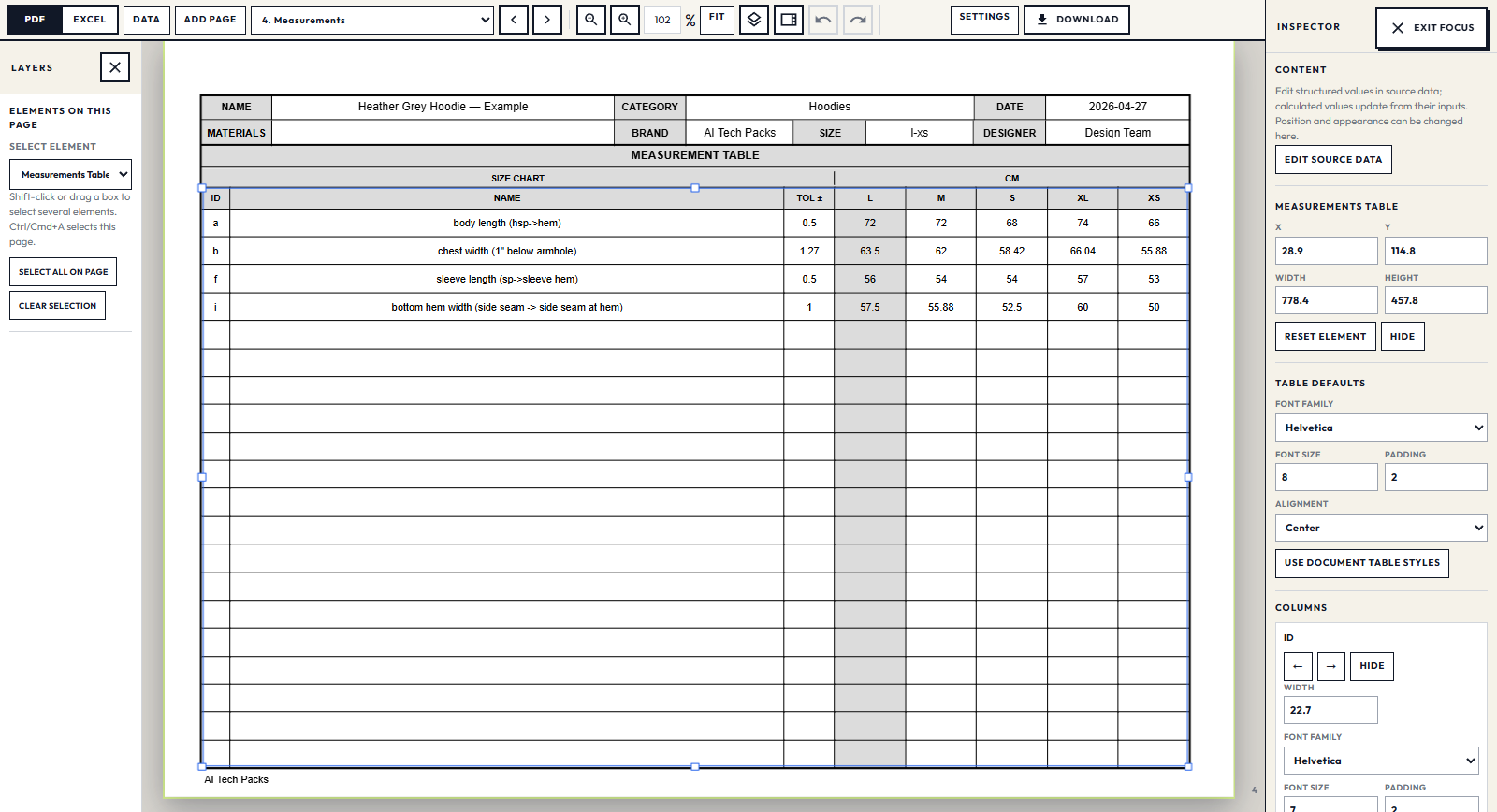
If you change the sleeve length, the factory needs to know where you’re measuring and which value to use. In the hoodie example below, the letters on the flat match the rows in the sample-size table. The next page puts the measurements for all sizes together.
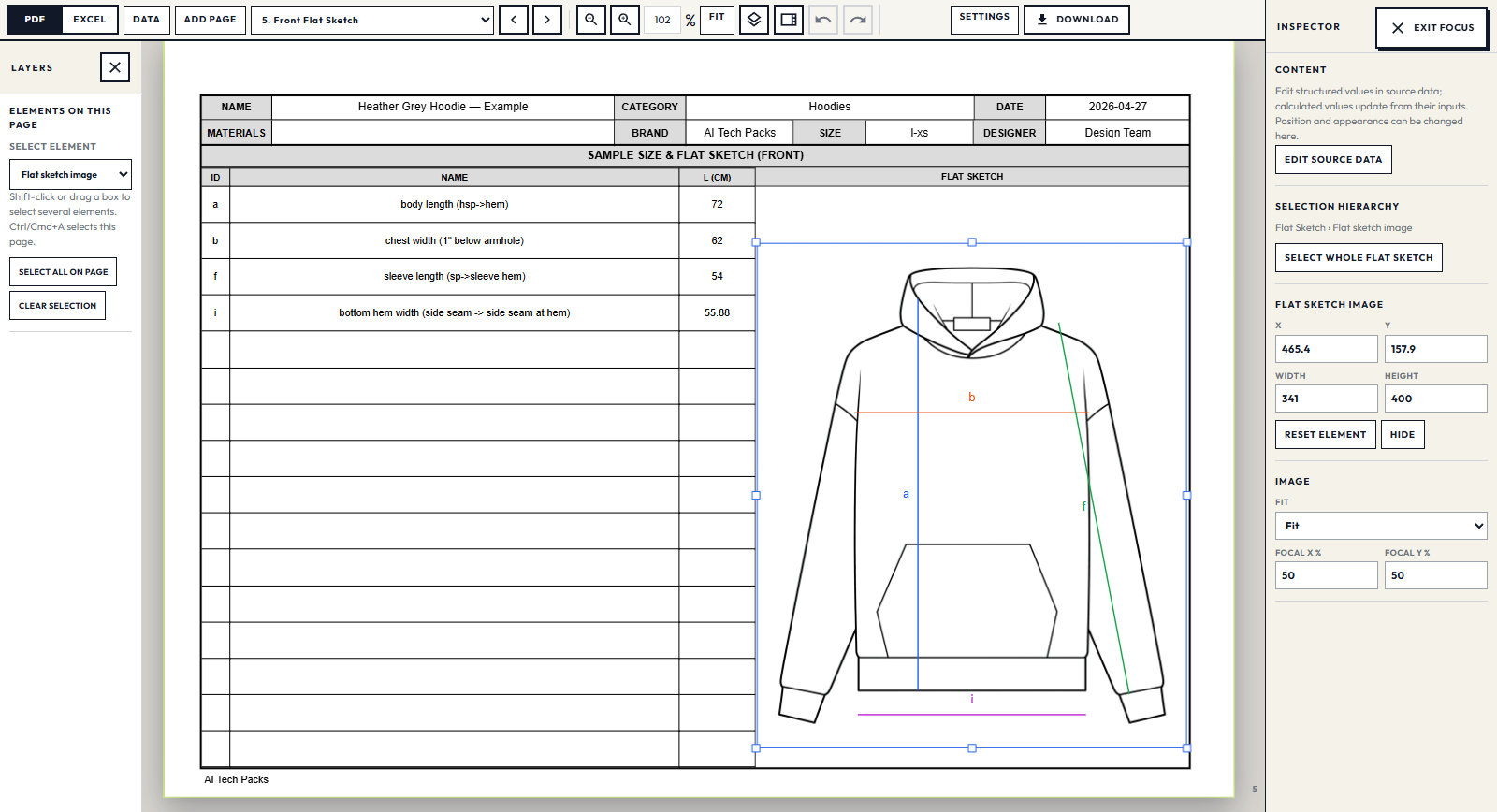
For changes to the flat itself, our live SVG beta focuses on grouped garment components, sewing lines and colorable fills. That work is aimed at edits such as selecting a group of sewing lines or recoloring a panel on supported sketches. See the PNG-to-SVG examples for a closer look at the results.
When Techpack Builder or PLMBR makes sense
Techpack Builder: work on your desktop
If you like working with files on your computer, Techpack Builder is worth a look. It runs on Mac and Windows and lets you bring sketches, tables and notes together on the document page. You can reuse templates and work offline. Builder also advertises AI features.
You keep an editable .tp file and can send your factory a PDF or a read-only .tpv file. Techpacker’s Builder guide explains these formats and its version log. Before relying on .tpv files for handoff, check that your factory can open them.
Builder may suit you if you already have drawings and specifications to assemble, especially when offline access and local working files matter to your team.
PLMBR: keep your team and suppliers on the same page
Sometimes making the techpack is only part of the problem. You also need to keep track of samples, supplier feedback and deadlines across a collection. That’s where PLMBR, Techpacker’s product lifecycle management platform, comes in.
Its plans include features such as materials and measurement libraries, sample tracking, grading and version history. Those become useful when several people need to work from the same product information and see what has changed.
AI Tech Packs focuses on creating, editing and sharing the techpack. If you are replacing a PLM, make sure your choice also covers the supplier management, sample tracking and scheduling your team relies on.
What does each option cost?
Prices checked September 14, 2026.
- AI Tech Packs: start with a free editable draft. On monthly billing, Pro is $48/month and Designer is $130/month. Pro includes PDF and Excel exports; Designer adds batch generation and Factory Share. A one-time $18 Single Export covers a PDF export.
- PLMBR Professional: $95 per user per month when billed annually, or $198 per user per month on monthly billing.
- Techpack Builder: check the Builder website for its current offer. It is priced separately from PLMBR.
For a team, add up the seats you need and check which plan includes your export and sharing options. An annual per-user price can look very different from the monthly bill for everyone who needs access.
Which one should you choose?
- AI Tech Packs is a good place to start if you want to turn a garment photo or sketch into a draft and edit it in your browser.
- Techpack Builder is worth considering if you prefer a desktop app, reusable document templates and offline editing.
- PLMBR makes more sense when you also need to coordinate suppliers, samples and development schedules across a team.
To try AI Tech Packs, use a garment you already know well. Upload the photo or sketch, generate a free draft and see what you need to change for your own design. You can work on it before choosing an export plan.
Create your draft in AI Tech PacksStill building your shortlist? Read our techpack software comparison for other tools focused on apparel development.


